
Back to Products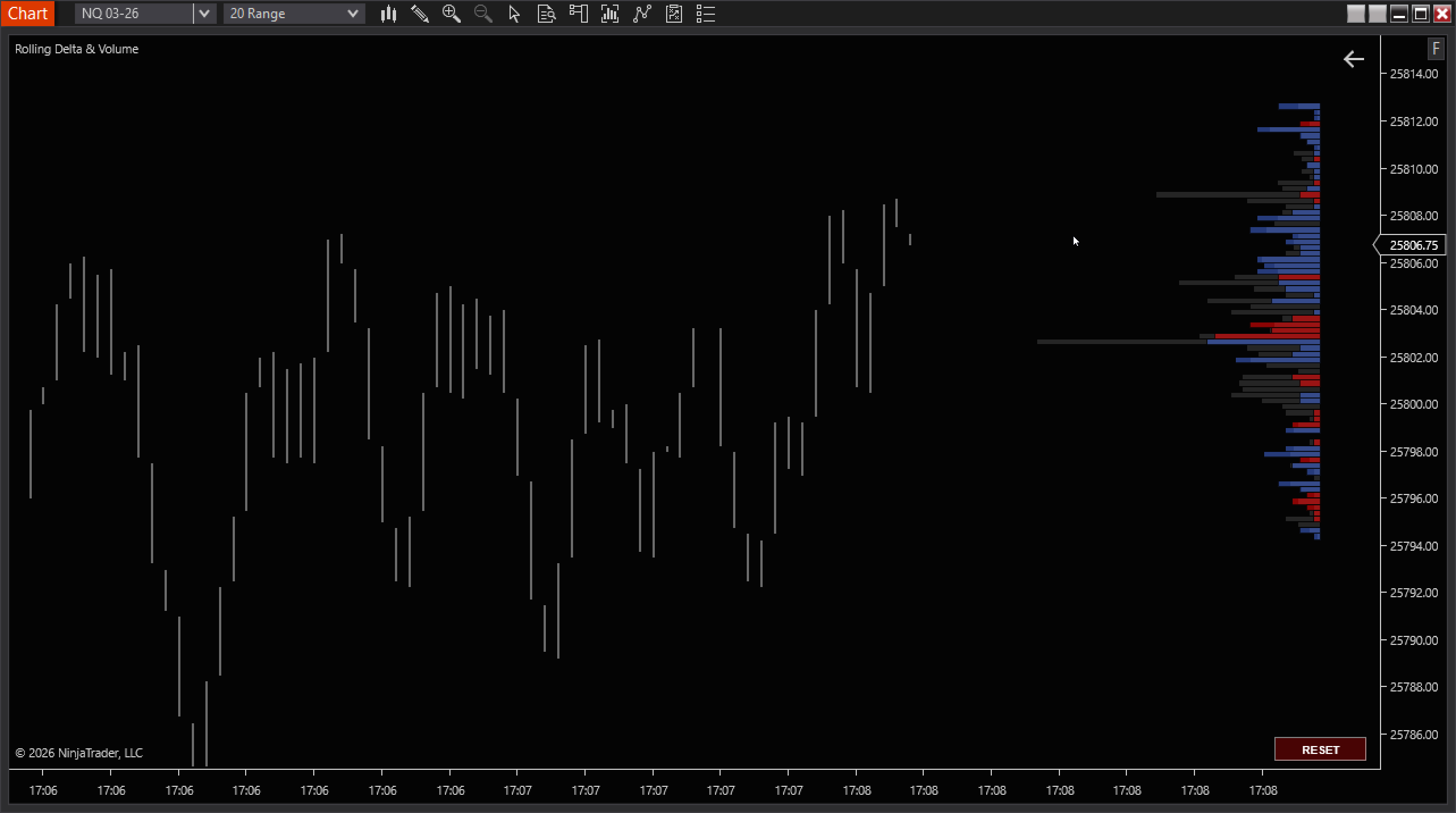
BAF Rolling Delta & Volume
Rolling Delta & Volume Profile with Reset options
$99One-time payment
Digital products are non-refundable. Please use the 14-day free trial before purchasing.
Rolling Delta & Volume Profile
A live, time-based rolling profile that continuously accumulates tick data and renders a real-time volume profile alongside a secondary profile (Delta or Bid/Ask), plus POC and optional stats. It is designed to be responsive by decoupling data collection from render frequency.
Core Features
Rolling Window
- •Window mode: Minutes or Seconds
- •Window value controls lookback length
- •Tick compression (N ticks per price bin)
- •Render interval (ms) controls display refresh
Profiles
- •Volume profile with configurable width, opacity, and color
- •Secondary profile: Delta mode or Bid/Ask mode
- •Optional per-bin text for volume and secondary values
- •Cluster outlines with configurable width/opacity
Market Structure Helpers
- •POC line based on max volume bin
- •Optional live stats (ticks, bins, total volume, delta %, POC)
- •Optional imbalance highlighting (threshold-based)
- •Vertical alignment options for rendered bins
Controls & Workflow
- •On-chart RESET button (optional)
- •Keyboard reset via Ctrl + ResetKey (default: R)
- •Right margin control for chart layout
- •Background-aware outline matching (optional)
Data Handling
⚡
Live tick accumulation
The indicator accumulates every incoming Last tick into a rolling queue and subtracts expired ticks as the window advances, so the profile always represents the current rolling time slice.
✓Rolling expiration using a timestamped tick queue.
✓Snapshot-based rendering (data collection continues while UI refreshes on an interval).
!Realtime-only behavior (shows “Waiting for live ticks...” until live data arrives).
Complete Customization
Volume Profile
- Show/Hide volume profile
- Width (px) and opacity
- Fill color
- Optional per-bin volume text
Secondary Profile
- Mode: Delta or Bid/Ask
- Width (px) and opacity
- Buy/Ask and Sell/Bid colors
- Optional per-bin text
Display & Styling
- POC line toggle + color
- Stats overlay toggle
- Imbalance toggle + threshold
- Outlines: enable, width, opacity, colors
Specs
CalculationOn each tick (live market data).
Rolling windowSeconds or Minutes; configurable value.
BinningTick compression groups N ticks into one price bin.
Secondary modesDelta (signed) or Bid/Ask split.
ResetOn-chart button + Ctrl + ResetKey (default R).
ℹBest Practices
- Use a smaller rolling window for execution (microstructure) and a larger one for context.
- Increase Tick Compression when the ladder becomes too dense or when performance matters more than granularity.
- If outlines look harsh on certain themes, enable outline auto-matching to background for cleaner separation.
- Keep the render interval modest (e.g., 250ms) to reduce UI churn while still feeling “live”.